Ansible Playbooks pt 3: Roles and ansible-galaxy (90 Days of DevOps)
In this section of the 90 Days of DevOps series, we continue our coverage of Ansible playbooks. We’ll spend this post reorganizing our existing playbook to make it more manageable as it grows. This post will also introduce Ansible roles, which can help with that process.
At the end of the previous post, we had a working playbook named web_welcome.yml. We successfully ran that playbook to configure our two web servers. Those servers are now running the simple example website shown below:
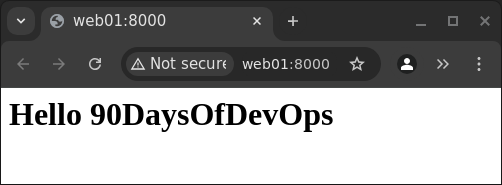
Our plan now is to build up a larger playbook capable of managing our full web environment. That means it should manage not only our web servers, but a database and load balancer as well.
Before expanding our playbook to work with those additional nodes, we will reorganize it to keep it more easily manageable. We’ll do this by making our playbook modular, breaking its different parts off into their own separate files.
Ansible’s documentation describes this general strategy here: https://docs.ansible.com/ansible/latest/playbook_guide/playbooks_reuse.html.
Separating tasks and handlers from the main playbook
We’ll start by moving all of our individual task and handler definitions out of our playbook, and into dedicated subdirectories named tasks and handlers.
Below is a comparison of our playbook’s home directory before and after our changes:
Directories/files before reorganizing
1
2
3
4
5
6
7
8
$ tree
.
├── templates
│   ├── index.html.j2
│   └── ports.conf.j2
└── web_welcome.yml

2 directories, 3 files
Directories/files after reorganizing
1
2
3
4
5
6
7
8
9
10
11
12
$ tree
.
├── handlers
│   └── main.yml
├── playbook2.yml
├── tasks
│   └── webservers_setup.yml
└── templates
    ├── index.html.j2
    └── ports.conf.j2

4 directories, 5 files
Along with the new directories, notice the new files we’ve created. We’ll go over the contents of those files below.
tasks subdirectory
First, we moved all of the tasks from our previous playbook, web_welcome.yml, into this new file:
tasks/webservers_setup.yml
1
2
3
4
5
6
7
8
9
10
11
12
13
14
15
16
17
18
19
20
21
22
23
24
- name: Ensure apache is at the latest version
  apt:
    name: apache2
    state: latest

- name: Write the apache2 ports.conf config file
  template:
    src: templates/ports.conf.j2
    dest: /etc/apache2/ports.conf
  notify:
  - Restart apache

- name: Write a basic index.html file
  template:
    src: templates/index.html.j2
    dest: /var/www/html/index.html
  notify:
  - Restart apache

- name: Ensure apache is running
  service:
    name: apache2
    state: started
handlers subdirectory
Similarly, we moved our one handler out of web_welcome.yml, and into its own new file:
handlers/main.yml
1
2
3
4
5
- name: Restart apache
  service:
    name: apache2
    state: restarted
Main playbook directory
Back in the main directory, we’ve replaced our old playbook web_welcome.yml with a new one named playbook2.yml. This new playbook uses Ansible’s import_tasks keyword (see lines 8 and 10 below) to reference our new task and handler files.
1
2
3
4
5
6
7
8
9
10
11
- hosts: webservers
  become: yes
  vars:
    http_port: 8000
    https_port: 4443
    html_welcome_msg: "Hello 90DaysOfDevOps"
  tasks:
    - import_tasks: tasks/webservers_setup.yml
  handlers:
    - import_tasks: handlers/main.yml
At this point our new playbook should work the same as the old one (this playbook just has a different name, and its contents are now spread across multiple files). We can run it to confirm that it works:
1
2
3
4
5
6
7
8
9
10
11
12
13
14
15
16
17
18
19
20
21
22
23
24
25
26
27
28
$ ansible-playbook playbook2.yml -K
BECOME password:

PLAY [webservers] ********************************************************************************

TASK [Gathering Facts] ***************************************************************************
ok: [web01]
ok: [web02]

TASK [Ensure apache is at the latest version] ****************************************************
ok: [web01]
ok: [web02]

TASK [Write the apache2 ports.conf config file] **************************************************
ok: [web01]
ok: [web02]

TASK [Write a basic index.html file] *************************************************************
ok: [web01]
ok: [web02]

TASK [Ensure apache is running] ******************************************************************
ok: [web01]
ok: [web02]

PLAY RECAP ***************************************************************************************
web01                      : ok=5    changed=0    unreachable=0    failed=0    skipped=0    rescued=0    ignored=0
web02                      : ok=5    changed=0    unreachable=0    failed=0    skipped=0    rescued=0    ignored=0
Everything looks good. Notice that no changes were applied, because our web servers were already in the correct configuration at the end of the previous post.
Next, we’ll take organization a step further, creating what is known as a “role” in Ansible.
Roles and Ansible Galaxy
Ansible roles allow us to formally define a directory hierarchy for our Ansible files in a way that makes them more easily shareable and reusable.
Creating a role
We create a new role using the ansible-galaxy command:
1
2
$ ansible-galaxy init roles/apache2
- Role roles/apache2 was created successfully
The command above creates a new roles directory, as well as an entire subtree of directories/files dedicated to our new role, which we’ve named apache2:
1
2
3
4
5
6
7
8
9
10
11
12
13
14
15
16
17
18
19
20
21
22
23
24
25
26
27
28
29
30
$ tree
.
├── handlers
│   └── main.yml
├── playbook2.yml
├── roles
│   └── apache2
│       ├── defaults
│       │   └── main.yml
│       ├── files
│       ├── handlers
│       │   └── main.yml
│       ├── meta
│       │   └── main.yml
│       ├── README.md
│       ├── tasks
│       │   └── main.yml
│       ├── templates
│       ├── tests
│       │   ├── inventory
│       │   └── test.yml
│       └── vars
│           └── main.yml
├── tasks
│   └── webservers_setup.yml
└── templates
    ├── index.html.j2
    └── ports.conf.j2

14 directories, 13 files
This new roles/apache2 subdirectory is where we’ll move all of the task, handler, and template files we’ve created so far.
1
2
3
$ mv handlers/main.yml roles/apache2/handlers/; \
  mv tasks/webservers_setup.yml roles/apache2/tasks/; \
  mv templates/* roles/apache2/templates/
Since we’re using the role’s directory structure to hold these files now, we no longer need the directories we originally created for them:
1
$ rmdir handlers tasks templates
That leaves us with just our playbook2.yml, and the roles/apache2 subdirectory with all of its contents:
1
2
3
4
5
6
7
8
9
10
11
12
13
14
15
16
17
18
19
20
21
22
23
24
25
26
$ tree
.
├── playbook2.yml
└── roles
    └── apache2
        ├── defaults
        │   └── main.yml
        ├── files
        ├── handlers
        │   └── main.yml
        ├── meta
        │   └── main.yml
        ├── README.md
        ├── tasks
        │   ├── main.yml
        │   └── webservers_setup.yml
        ├── templates
        │   ├── index.html.j2
        │   └── ports.conf.j2
        ├── tests
        │   ├── inventory
        │   └── test.yml
        └── vars
            └── main.yml

11 directories, 12 files
Editing the role’s tasks/main.yml file
Looking at the tree above, the ./roles/apache2/tasks/ directory contains two files: main.yml, which got auto-generated when we created the role, and webservers_setup.yml, which we moved into the directory ourselves.
In a situation like this where both main.yml and other .yml files are present, main.yml takes priority and Ansible will not automatically use the other files. For that reason we need to make a quick edit to the auto-generated ./tasks/main.yml file (line 3 below):
1
2
3
4
---
# tasks file for roles/apache2
- import_tasks: webservers_setup.yml
Adding the role to our playbook
Because all of our task, handler and template files are now tucked away in the ./roles/apache2/ directory, we’ll need to update our playbook so that Ansible knows to look for related files in this directory. This is done by adding a new roles entry to our playbook.
While we’re editing our playbook with that change, we’ll also:
- remove its existing task and handler imports, which are no longer necessary thanks to the role, and
- update the
html_welcome_msgvariable, so that the playbook will update our website with a new message.
Below is our playbook after these changes:
1
2
3
4
5
6
7
8
9
- hosts: webservers
  become: yes
  vars:
    http_port: 8000
    https_port: 4443
    html_welcome_msg: "Hello 90DaysOfDevOps, and welcome!"
  roles:
    - apache2
Notice the changes from lines 6 onward.
If this playbook still works as expected, running it now should result in our updated html_welcome_msg being served by both web servers. Let’s try it:
1
2
3
4
5
6
7
8
9
10
11
12
13
14
15
16
17
18
19
20
21
22
23
24
25
26
27
28
29
30
31
32
$ ansible-playbook playbook2.yml -K
BECOME password:

PLAY [webservers] ********************************************************************************

TASK [Gathering Facts] ***************************************************************************
ok: [web01]
ok: [web02]

TASK [apache2 : Ensure apache is at the latest version] ******************************************
ok: [web01]
ok: [web02]

TASK [apache2 : Write the apache2 ports.conf config file] ****************************************
ok: [web02]
ok: [web01]

TASK [apache2 : Write a basic index.html file] ***************************************************
changed: [web02]
changed: [web01]

TASK [apache2 : Ensure apache is running] ********************************************************
ok: [web01]
ok: [web02]

RUNNING HANDLER [apache2 : Restart apache] *******************************************************
changed: [web02]
changed: [web01]

PLAY RECAP ***************************************************************************************
web01                      : ok=6    changed=2    unreachable=0    failed=0    skipped=0    rescued=0    ignored=0
web02                      : ok=6    changed=2    unreachable=0    failed=0    skipped=0    rescued=0    ignored=0
The output looks good, showing that changes were successfully made on both web servers. We can confirm everything by loading our website again:
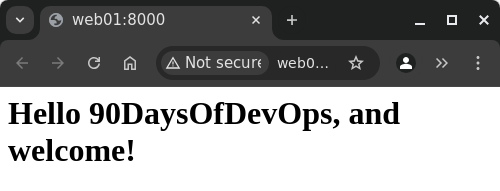
Our welcome message has been successfully updated.
In this post, we’ve broken down our playbook into smaller, reusable pieces. We also reorganized those pieces with the help of Ansible roles. In upcoming posts, we will expand our playbook to manage not only our web servers, but our other nodes as well.
<< Back to 90 Days of DevOps posts
<<< Back to all posts