Deploying to Kubernetes / EKS (DevOps the Hard Way series)
In the previous posts, the Uber software was containerized using Docker, and the resulting container image was saved to an Amazon Elastic Container Registry (ECR). In this post, we deploy that software from Amazon ECR to the Kubernetes cluster built earlier on Amazon EKS.
Connecting to Elastic Kubernetes Service (EKS)
aws eks update-kubeconfig
The first step is to to connect to the EKS cluster via the aws eks update-kubeconfig command, as shown below.
1
2
3
$ aws eks --region *your_aws_region* update-kubeconfig \
  --name devopsthehardway-cluster
Added new context arn:aws:eks:****:****:cluster/devopsthehardway-cluster to /home/****/.kube/config
kubectl get nodes
The connection to EKS can then be verified using the Kubernetes CLI command kubectl.
1
2
3
$ kubectl get nodes
NAME                       STATUS   ROLES    AGE   VERSION
ip-****.compute.internal   Ready    <none>   10m   v1.29.3-eks-ae9a62a
Creating the Kubernetes manifest
A “manifest,” per the official Kubernetes glossary, is a:
Specification … in JSON or YAML format. A manifest specifies the desired state of an object that Kubernetes will maintain when you apply the manifest.
This definition indicates that a manifest is declarative, just like the Terraform modules covered in previous sections.
deployment.yml
The author of the DevOps the Hard Way repository provides the manifest file deployment.yml as shown below.
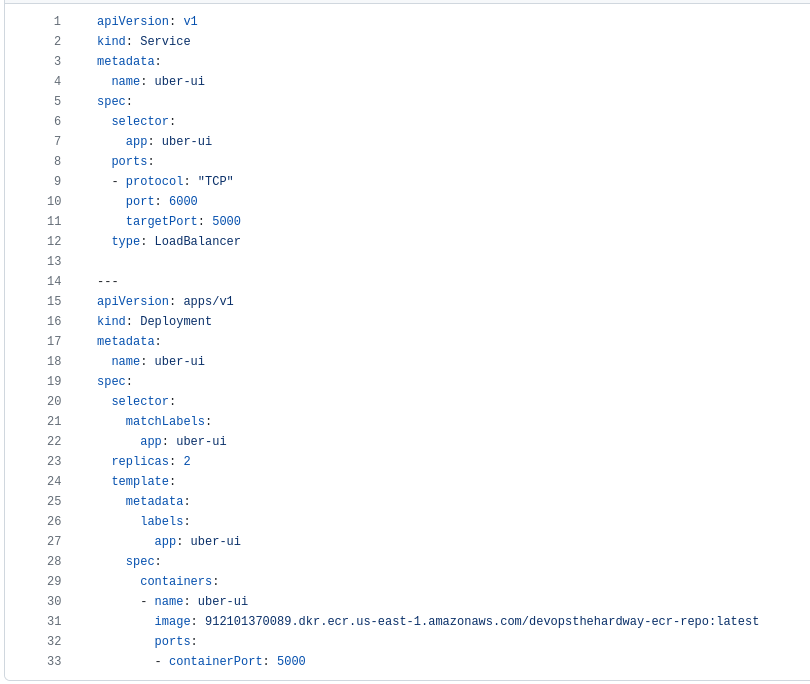
Here is an overview of some important entries in this Kubernetes manifest:
The Service section
-
Lines
3-4: A Service nameduber-uiis declared (via.metadata.name) -
Lines
8-11: The network ports to be used are declared. The container exposes TCP port 5000 within Kubernetes (TargetPort), while the Service itself runs over TCP port 6000 (Port)
The Deployment section
-
Lines
17-18: A Deployment nameduber-uiis declared (via.metadata.name) -
Lines
19, 23: A ReplicaSet is created with two replicas (via.spec.replicas) -
Line
31: The manifest will require editing on this line, where the author’s own ECR info is hard-coded:
1
        image: 912101370089.dkr.ecr.us-east-1.amazonaws.com/devopsthehardway-ecr-repo:latest
This line must be changed to the actual ECR being used, e.g.:
1
        image: *your_aws_account_id*.dkr.ecr.*your_aws_region*.amazonaws.com/devopsthehardway-ecr-repo:latest
Once the line has been fixed, the manifest file can be used to deploy the Uber app from its home on the Elastic Container Registry to the Kubernetes/EKS cluster.
Deploying the Uber app to EKS
kubectl apply
When run from the same directory where the manifest above is saved, the following Kubernetes CLI command will attempt the app deployment:
1
2
3
$ kubectl apply -f deployment.yml   # -f to specify a filename
service/uber-ui created
deployment.apps/uber-ui created
kubectl get deployments
The deployment can then be verified by running:
1
2
3
$ kubectl get deployments
NAME      READY   UP-TO-DATE   AVAILABLE   AGE
uber-ui   2/2     2            2           60s
NAMElists the names of the Deployments in the namespace.READYdisplays how many replicas of the application are available to your users. It follows the pattern ready/desired.UP-TO-DATEdisplays the number of replicas that have been updated to achieve the desired state.AVAILABLEdisplays how many replicas of the application are available to your users.AGEdisplays the amount of time that the application has been running.
kubectl rollout status
Another useful command in this scenario is kubectl rollout status.
1
2
$ kubectl rollout status deployment/uber-ui
deployment "uber-ui" successfully rolled out
At this point, the Uber app has been successfully deployed from our container image in Elastic Container Registry to our Kubernetes cluster on Amazon EKS.
The entire process has benefited from infrastructure-as-code tools:
- The AWS VPC hosting the Kubernetes cluster was built using a CloudFormation template.
- The Docker image for the Uber app was built using a Dockerfile.
- The AWS ECR and the EKS cluster were both built using Terraform modules.
Infrastructure as code makes the deployment process faster, less error-prone, and more easily repeatable than building everything without IaC.
In the next post, we will see how infrastructure as code can be tested for security issues and/or policy compliance.