Post #1c: Setting up this blog itself (CDN, HTTPS)
With a blog up and running on the web over HTTP, the next step was to secure it with HTTPS.
As of this writing, S3 website endpoints don’t support HTTPS, so the solution was to serve this blog behind AWS CloudFront, instead of directly via S3 as described in the previous post. This way, CloudFront handles the required TLS Certificate and HTTPS headers, while still using an S3 bucket as a web content source, a.k.a. its “origin” in CloudFront terminology.
As far as deployment of this solution goes, AWS provides a git repository containing a CloudFormation template to build out the infrastructure described above, which I used. It generates the required TLS Certificate via AWS Certificate Manager, and then associates it with a new CloudFront distribution to present a cache of the content from S3 to the Internet over HTTPS.
At that point, all priorities for the blog project were met. To review those priorities from the first post in this series:
-
The goal: create a simple personal blog on the public Internet.
-
Project priorities: lightweight; minimize cost; minimize maintenance overhead; use AWS cloud, require TLS
Probably the most unexpected snag in setting this blog up appeared after all of those requirements were met; the /about/ link at the top of the blog broke after putting the site behind CloudFront.
Following that link would lead to Cloudfront returning an error:
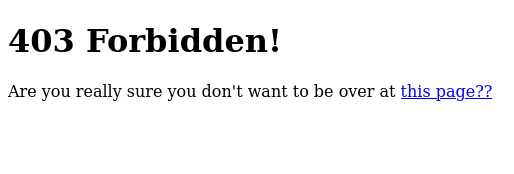
The link provided by the error page was a redirect to /about/index.html, which would then present the expected content.
This turned out to be a CloudFront-specific issue, as described in the CloudFront documentation. Specifically:
If you define a default root object, an end-user request for a subdirectory of your distribution does not return the default root object. For example, suppose index.html is your default root object and that CloudFront receives an end-user request for the install directory under your CloudFront distribution:*
https://d111111abcdef8.cloudfront.net/install/
CloudFront does not return the default root object even if a copy of index.html appears in the install directory.
As mentioned later in that document, this CloudFront behavior is different from what happens when the same request is made against an S3 website endpoint. In the case of this blog, you could substitute https://blog.milkywaysquirreldeer.net/about/ for the URL above, and then the documentation explains exactly what was happening.
As a fix, there was no need to re-invent the wheel as Cloudfront-cached static websites with S3 origins are an expected use case. AWS provides a ready-made JavaScript function which adds index.html to the end of any bare subdirectory path requested by an end user.
It was necessary to create that function in CloudFront. Then, the function could be associated with the CloudFront distribution’s Default(*) behavior in the AWS Console under ‘Function associations / Viewer Request’, as shown below.
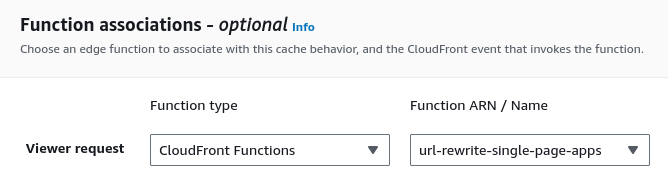
After that, the /about/ link in this blog was once again working.
That’s it for this series on setting up this blog on the Internet. See you in future posts!